~/guide/chapters/04-networking $ cat README.md
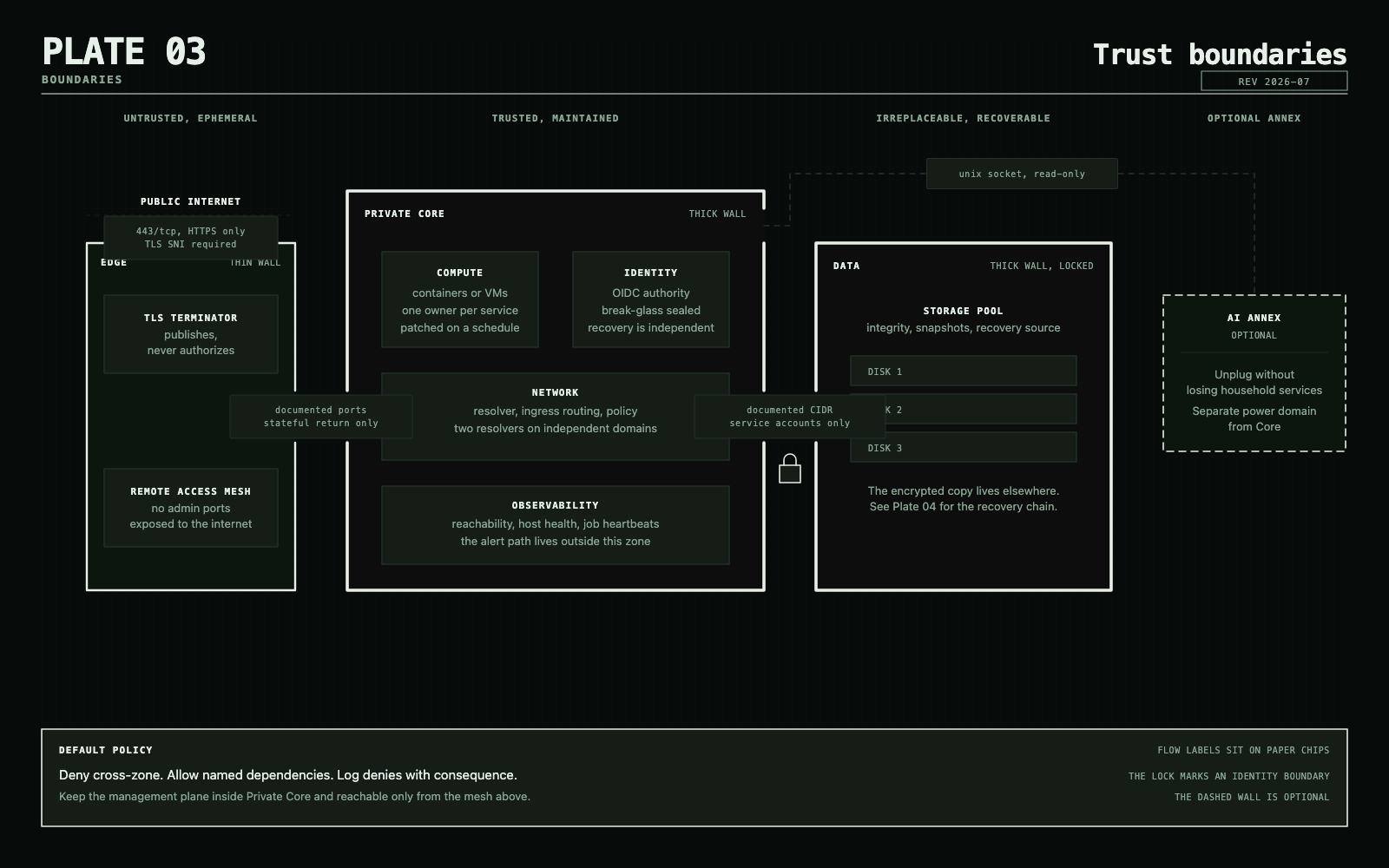
Design networking and access
Segmentation should express trust and failure boundaries, not produce an impressive VLAN count.

Start with semantic zones
- Trusted clients: ordinary household computers and phones.
- Services: application hosts that accept defined client traffic.
- Management: hypervisors, switches, storage administration, and monitoring.
- IoT and media: devices that need limited local access and often broad internet access.
- Guest/untrusted: internet access without private-network reachability.
- DMZ: optional, for deliberately public services isolated from management.
Default-deny new flows between zones, then permit documented dependencies and stateful return traffic. Keep management planes reachable only from the management zone or a private VPN.
DNS and DHCP
Pi-hole is the approachable default for network-wide blocking. Technitium is the stronger default when you need authoritative internal zones, recursion, APIs, policies, or clustering. AdGuard Home is a good turnkey alternative.
Run two resolvers on independent failure domains. Avoid a dependency loop where each resolver, container runtime, identity service, and dashboard requires the other resolver to start.
Ingress
Caddy is the default for a small home because its configuration is compact and automatic HTTPS is built in. Traefik earns its extra moving parts in dynamic Docker or Kubernetes environments. Nginx Proxy Manager remains a reasonable UI-first entry point when its database and configuration are backed up.
Keep administrative services private even when a reverse proxy can publish them. A valid certificate does not make an admin panel safe for the internet.
Remote access
Tailscale is the default because it makes a WireGuard-based private network approachable and adds policy controls. Test grants and preserve recovery access. Plain WireGuard is excellent for a small static peer set. Headscale is for people who explicitly want to operate the coordination plane too.
Do not forward raw SSH, RDP, hypervisor, NAS, or router administration ports.
Discovery protocols
Some household devices rely on multicast DNS or broadcast discovery. Relay it narrowly between the exact zones that need it. Do not flatten segmentation just to make discovery work.
Primary references
Leave with
Semantic zones and a map of allowed flows.
Done when: Administration remains private and exceptions are explicit.